Regarding reliable and high-quality 3D printing, the Ender 3 Max Neo is a top choice for enthusiasts and professionals. This powerful Ender 3D printer combines precision and durability, making it an excellent option for those looking to elevate their 3D printing projects.
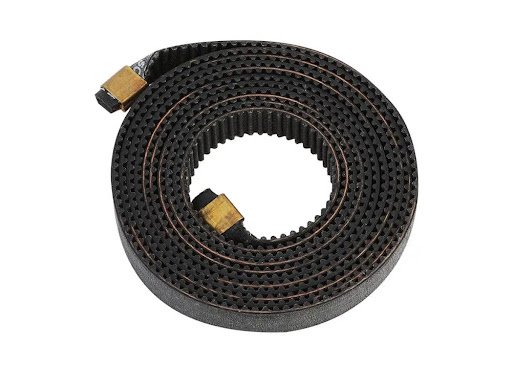
The X-axis belt is a crucial component that directly impacts print quality and accuracy. This seemingly simple part ensures smooth and precise movements along the X-axis, ultimately leading to more accurate prints. In this article, we’ll explore the significance of the Creality Ender 3 Max Neo X-axis belt, how to maintain it, and why it’s essential for optimal 3D printing performance.
Understanding the Importance of the X-Axis Belt
The X-axis belt moves the print head from side to side during printing. Any looseness, wear, or misalignment in the belt can lead to layer shifting, inaccurate dimensions, or surface imperfections in the final print.
Key Functions of the X-Axis Belt:
- Precision Movement: Ensures that the print head moves accurately across the X-axis, preventing distortion in prints.
- Consistent Layer Alignment: Reduces the risk of misaligned layers, improving overall print quality.
- Smooth Operation: This minimizes vibrations and mechanical resistance, leading to a quieter and more stable printing experience.
- Longevity of Printer Components: A well-maintained belt reduces strain on the stepper motors and other mechanical parts, extending the lifespan of the Ender 3 Max Neo.
How to Maintain and Adjust the X-Axis Belt on the Ender 3 Max Neo
Proper belt tension and alignment are essential for maintaining print accuracy and consistency. Here’s how you can keep the Ender 3 Max Neo X-axis belt in top shape:
1. Checking Belt Tension
- The belt should be tight enough to prevent slack but not overly tight to cause excessive wear.
- If you press lightly on the belt, it should provide some resistance but should not sag.
- Overly loose belts can cause misalignment, while overly tight belts can lead to motor strain.
2. Adjusting the Belt Tension
If you notice issues like skipped steps, inconsistent prints, or unusual noise, follow these steps to adjust the tension:
- Locate the tensioner on the X-axis.
- Loosen the screws securing the tensioner.
- Adjust the tension by rotating the knob until the belt feels firm but not overly stretched.
- Retighten the screws and test the printer to ensure smooth movement.
3. Cleaning and Inspecting the Belt
Over time, dust, debris, and filament particles can accumulate on the belt, affecting its performance. To clean and inspect it:
- Use a dry microfiber cloth or a soft brush to remove dirt.
- Check for signs such as cracks or fraying.
- If the belt appears worn out, consider replacing it with a new one to maintain optimal performance.
4. Lubricating the Pulleys and Bearings
Although the belt itself doesn’t require lubrication, the pulleys and bearings should be kept in good condition:
- Apply a small amount of lubricant to the X-axis pulley and bearings to ensure smooth movement.
- Avoid over-lubrication.
By following these maintenance steps, you can extend the life of your Ender 3 Max Neo X-axis belt and enjoy consistently high-quality prints.
Common Issues and Troubleshooting the X-Axis Belt
Even with proper maintenance, you may occasionally encounter issues with the X-axis belt. Here’s how to address some common problems:
1. Layer Shifting or Misalignment
- Check for loose belts and adjust the tension as needed.
- Ensure the X-axis pulley is secure and not slipping.
2. Unusual Noises or Grinding Sounds
- Inspect the belt for wear or damage.
- Lubricate the pulleys and check for any obstructions along the X-axis.
3. Inconsistent Print Quality
- Make sure the belt is evenly tensioned across its length.
- Ensure the stepper motor is functioning correctly and not skipping steps.
Whether you’re printing functional prototypes, artistic creations, or industrial components, this printer offers the reliability and versatility needed by any resin 3D printer enthusiast.
Conclusion
A well-maintained X-axis belt ensures high-quality prints with your Ender 3 Max Neo. By keeping the X-axis belt in optimal condition by regularly checking, adjusting, and maintaining, you can achieve better results in your 3D printing and design projects, whether you’re working on functional prototypes, artistic models, or engineering parts.